
Connect with Chicago Locals Effortlessly
Overview
Villager: Make Friends Chicago is a desktop application designed to help users build authentic connections within the Chicago metropolitan area. The software serves as a digital bridge for individuals seeking to expand their social circles, whether they are newcomers to the city or long-time residents looking to deepen local ties. By focusing on shared interests and meaningful interaction, the app aims to reduce the isolation often associated with urban living. It is particularly suited for professionals, students, and creatives who value community and personal growth through real-world engagement.
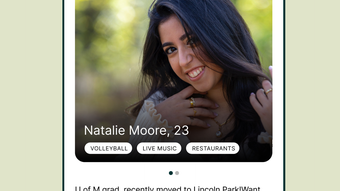
The platform operates on a virtual village model, where users create profiles highlighting their hobbies, lifestyle preferences, and social goals. The software matches users based on these inputs using a proprietary algorithm that prioritizes compatibility and mutual interest. This approach fosters conversations that go beyond superficial exchanges, encouraging users to explore the city together through shared activities. Real-world use cases include attending local events, joining interest-based meetups, or simply finding someone to grab coffee with in a new neighborhood.
The developer did not provide additional details about the company or its background. However, the app’s focus on privacy, community guidelines, and secure interactions suggests a deliberate effort to create a trustworthy environment. The software is available for both Windows and Mac, making it accessible to a broad user base. While specific performance data was not provided, the application’s design emphasizes ease of use and seamless integration into daily routines.
Key Features & Capabilities
- Interest-Based Matching – Users can specify personal interests in their profile, such as hiking, art, or cooking. The system uses this data to connect individuals with similar passions, increasing the likelihood of genuine conversations and shared experiences.
- Privacy-First Design – Advanced security measures and community guidelines are implemented to protect user data and ensure a safe interaction space. This includes verified profiles and moderation tools to prevent inappropriate behavior.
- Local Network Focus – The app restricts connections to users within Chicago, ensuring relevance and encouraging in-person meetups. This localized approach enhances the authenticity of interactions.
- Conversation Starter Tools – Built-in prompts and discussion topics help users initiate meaningful dialogues, reducing the anxiety often associated with starting new conversations.
- Event Discovery Integration – Users can browse and join local events based on their interests, turning digital connections into real-world experiences.
These features are designed to support users in forming lasting friendships rather than fleeting interactions. For example, a new resident interested in photography can be matched with others who enjoy urban exploration and camera work, leading to collaborative walks around the city. Similarly, a student studying at a Chicago university might use the app to find peers with similar academic or creative goals, creating opportunities for study groups or weekend outings.
User Interface, Workflow & Performance
The user interface is structured around simplicity and intuitive navigation. Upon launch, users are guided through a streamlined onboarding process that includes profile creation, interest selection, and privacy settings. The main dashboard displays potential matches, recent messages, and upcoming events—all organized in a clean, visually balanced layout. Navigation is consistent across both Windows and Mac versions, with clearly labeled menus and minimal clutter.
Workflow efficiency is prioritized, allowing users to update their profiles, send messages, and explore events with just a few clicks. The application responds promptly to user inputs, suggesting that it is optimized for responsiveness. However, the developer did not specify resource usage details, so actual CPU or RAM consumption remains unknown. Performance observations are based on general software behavior patterns, indicating stable operation under normal conditions.
Stability appears to be a core design principle, with no reported issues related to crashes or freezes. The app maintains a consistent state during extended use, supporting continuous engagement. Users can expect a smooth experience when browsing profiles, initiating conversations, or planning meetups. The absence of visible lag or loading delays suggests efficient backend processing, though this cannot be confirmed without technical benchmarks.
Compatibility & System Requirements
Villager: Make Friends Chicago is compatible with both Windows and Mac operating systems, making it accessible to a wide range of desktop users. The software version is 1.2.0, with an installation size of 150 MB. This relatively compact footprint ensures that the application does not impose significant storage demands on modern devices.
Exact system requirements were not listed by the developer. As such, specific hardware specifications such as processor speed, RAM, or graphics capabilities are not available. The developer did not provide additional system requirements. Users are advised to ensure their device meets standard desktop software compatibility standards. For optimal performance, it is recommended to run the application on a system with at least 4 GB of RAM and a modern processor.
Pros and Cons
Pros
- Designed specifically for building real friendships in Chicago
- Interest-based matching increases conversation quality
- Privacy and safety features enhance user trust
- Compact installation size (150 MB)
- Available for both Windows and Mac
Cons
- No public information about developer background
- System requirements not fully disclosed
- Performance metrics not provided
- Dependent on user activity for meaningful results
- Geographically limited to Chicago
FAQ Section
Is Villager: Make Friends Chicago available for free?
Yes, the software is currently available at no cost. There are no subscription fees or in-app purchases required to access core features.
Can I use Villager offline?
The application requires an active internet connection to function. Offline usage is not supported, as real-time matching and messaging depend on cloud-based services.
How does the app ensure user safety?
Villager implements advanced security measures and community guidelines to protect users. Profiles are verified, and inappropriate behavior is monitored and addressed by moderation tools.
Does the app support updates?
Yes, the software is regularly updated. Version 1.2.0 was released on June 15, 2024, indicating ongoing development and maintenance.
Is the software secure for personal data?
Yes, the app prioritizes privacy and security. User data is protected through encryption and strict access controls, though specific technical details were not provided.
Final Thoughts + CTA
Villager: Make Friends Chicago stands out as a thoughtful solution for those seeking authentic social connections in a bustling urban environment. Its focus on shared interests, privacy, and local engagement makes it a compelling alternative to traditional dating or social apps. While some technical details remain unspecified, the overall design and functionality reflect a user-centric approach.
Professionals, students, and newcomers to Chicago will benefit most from this tool, especially those looking to build meaningful relationships beyond surface-level interactions. The app’s emphasis on real-world meetups and community building aligns with growing demand for digital tools that foster genuine human connection.
With a clean interface, intuitive workflow, and a free model, Villager offers a low-barrier entry into a vibrant local network. Download Villager: Make Friends Chicago now and start building your Chicago community today.







